 by Albright Labs

Sendly
Reach more inboxes. Lose fewer campaigns.
Get campaigns delivered, even when SendGrid blinks. Then see exactly who opened, who clicked, and who didn't.
No credit card · Bring your own SMTP · 500 subscribers free
Why Sendly?
Send bulk email that actually reaches the inbox
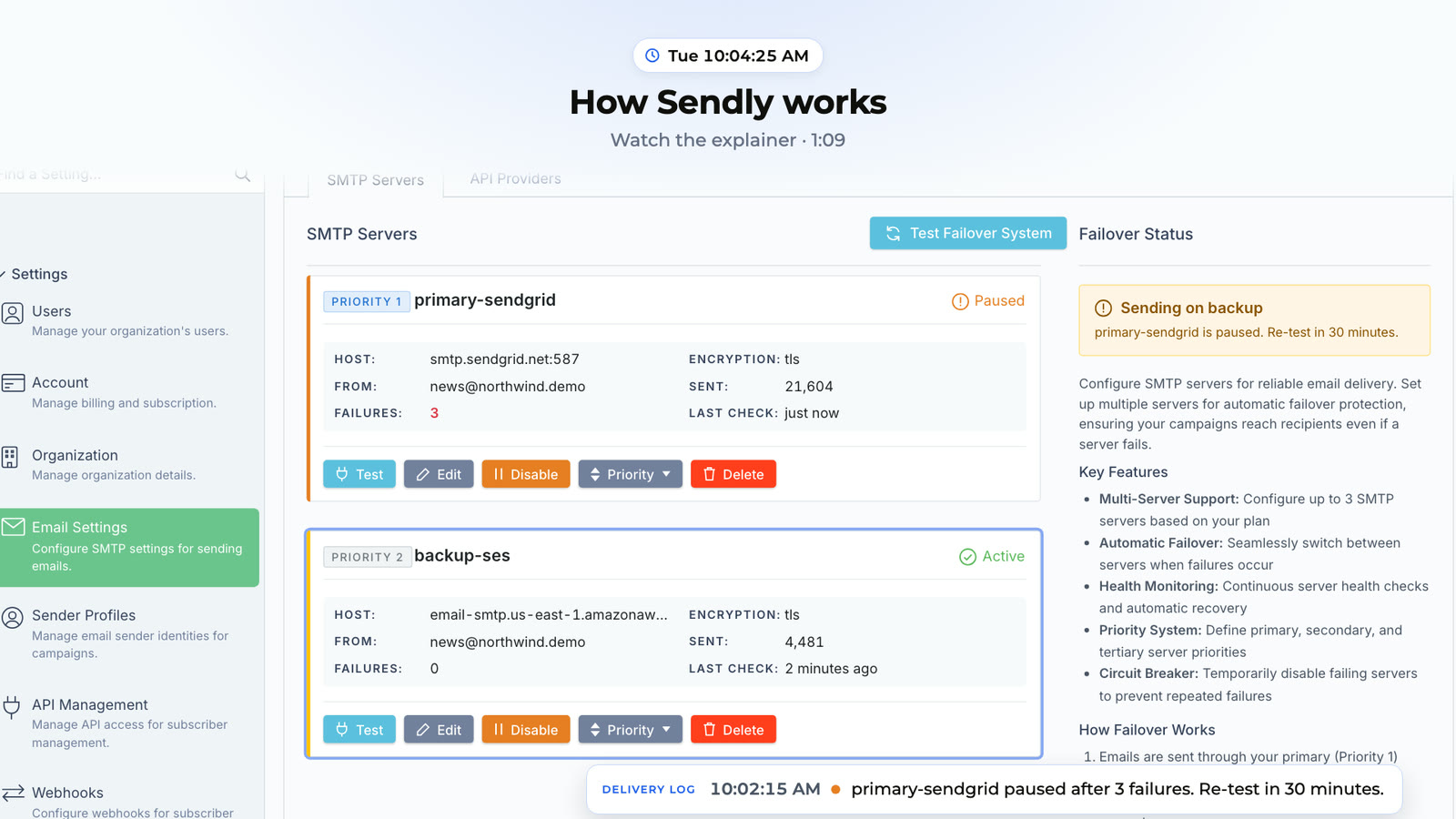
Your send doesn't care when your provider goes down
If your primary mail server stops accepting mail mid-send, Sendly retries that email on your backup and finishes the campaign there. Pro includes a backup server; Enterprise includes three or more.
See exactly who opened and who clicked
Opens and clicks are recorded per subscriber as they happen, on every plan, with no setup. Spot your most engaged readers (and your dead lists) without waiting for a daily digest.
Send the right message to the right people
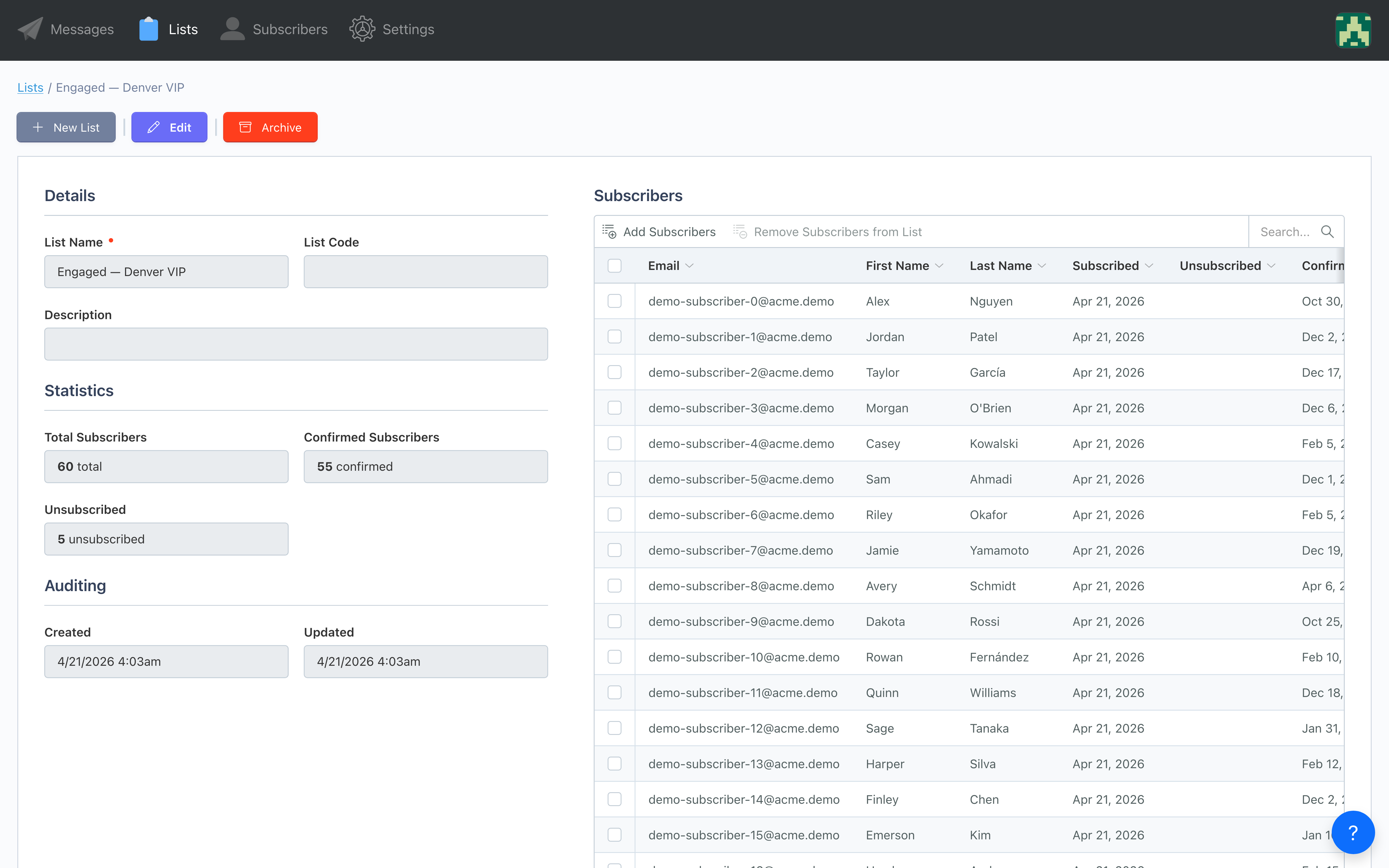
Sort subscribers into as many lists as you need, import standard fields like name and company by CSV, add your own custom fields through the API, and personalize every email with merge tags.
How Sendly works.
From CSV to inbox in under 10 minutes.
Connect your sender and import subscribers
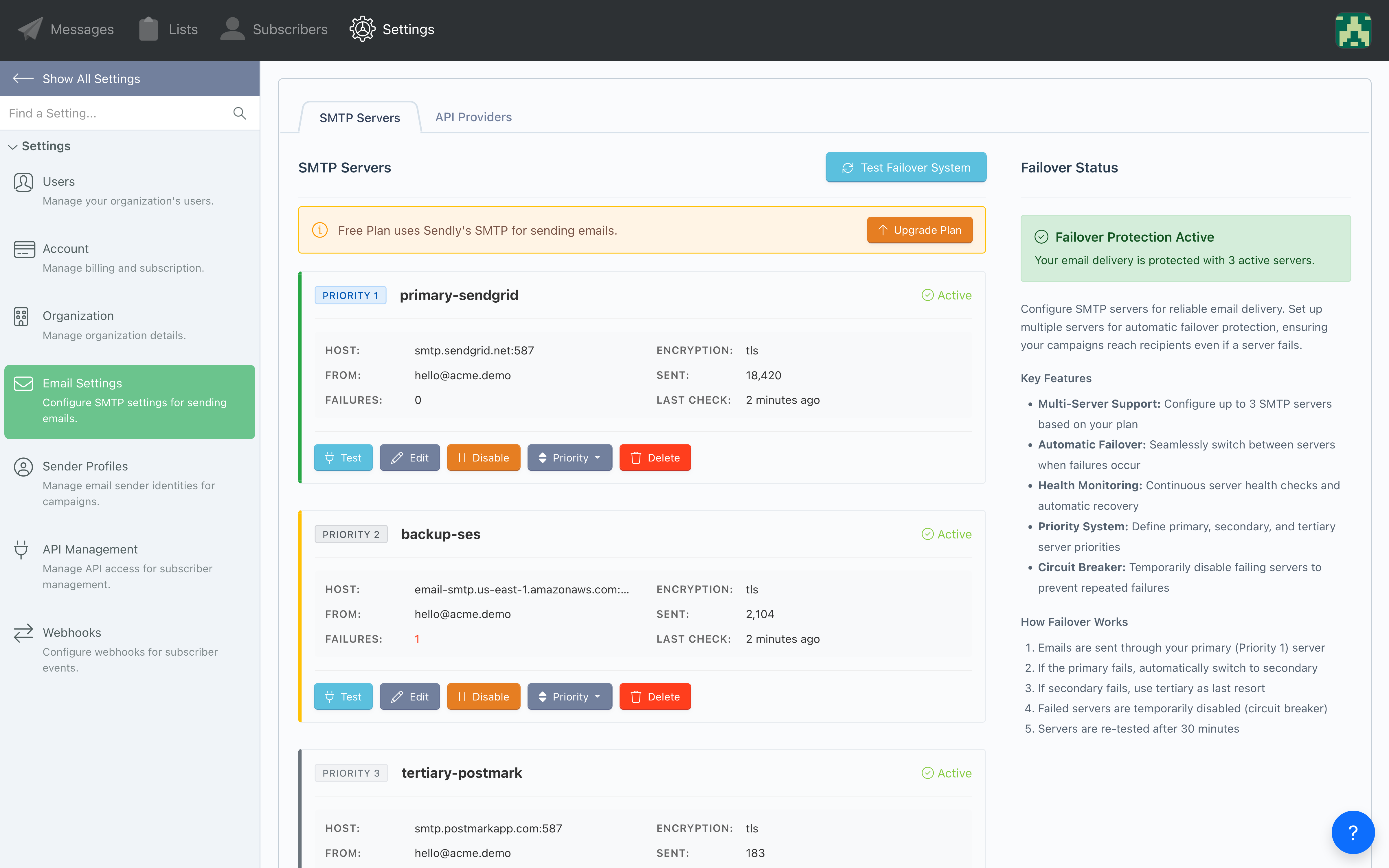
Add your own SMTP server (Google Workspace, Microsoft 365, SendGrid, Mailgun, Amazon SES and more) and the From address you send as, then upload a CSV or add subscribers through the API. CSV import maps standard fields such as name, company and phone; your own custom fields come in through the API.
Design your message
Write in the rich-content editor or paste your own HTML, add merge tags with fallbacks, and send yourself a test before you launch.
Send it or schedule it
Send immediately or schedule for later. If your primary server fails mid-send, Sendly finishes the campaign on your backup.
Built to land in inboxes, not spam folders.
From the first signup to the next renewal, every email pulls its weight.
Your campaigns send, even when your provider doesn't
When SendGrid hiccups mid-blast, Sendly retries the same email on your backup server. No angry Monday call from marketing about why nothing went out.
- Works with any SMTP provider you already use
- Backup servers on Pro, 3+ on Enterprise
- Automatic health checks
- Failover mid-send, without resending to anyone
- If every server is down, sends wait and your admins get an alert
See what's working. Double down on it.
Lists built around your own custom fields, per-subscriber open and click tracking, and reporting that updates as opens and clicks come in.
- Lists with your own custom fields
- Merge tags from any imported field
- 30‑day performance metrics
- Open, click, and bounce tracking
- Email validation that flags bad, disposable and duplicate addresses
Drop Sendly into your app, not your sprint backlog
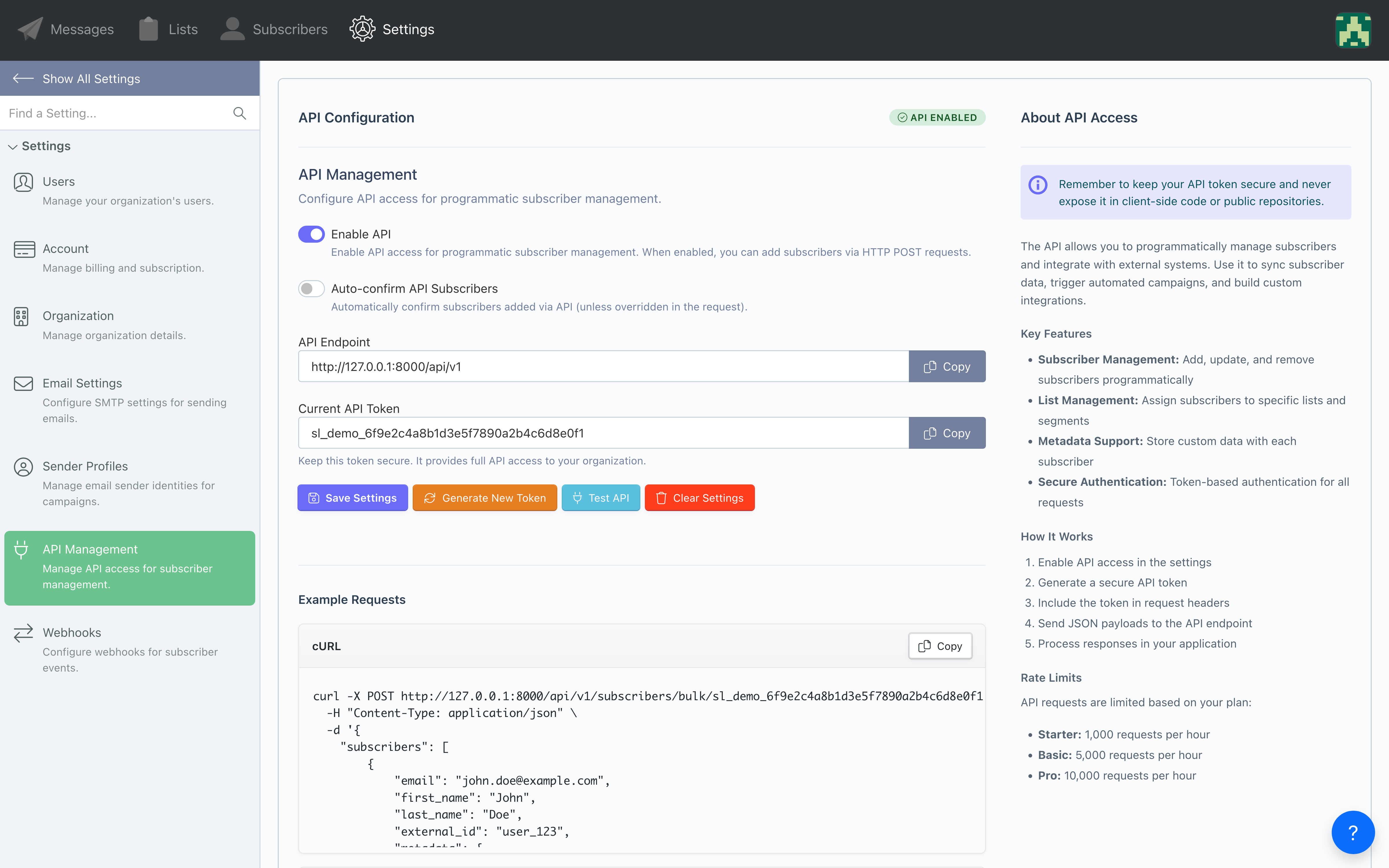
A REST API for subscribers and lists, webhooks for subscriber events, and sending through your own Brevo, SendGrid, Mailgun or Postmark account.
- REST API for subscribers and lists (Pro and up)
- Webhooks for subscriber events
- Brevo, SendGrid, Mailgun and Postmark API sending (Pro and up)
- Amazon SES over SMTP
- Native October CMS v3 plugin
Simple, scalable pricing.
No per-email charges. Send through your own email provider.
Free
- 500 subscribers
- 3 campaigns
- 1 SMTP server (your own)
- Open and click tracking per subscriber
- "Sent via Sendly" footer on your emails
Basic
- 2,500 subscribers
- 15 campaigns
- 1 SMTP server (your own)
- Schedule campaigns
- No Sendly footer on your emails
Pro
- 15,000 subscribers
- 2 SMTP servers with failover
- API email providers
- Full API access
- Automated follow‑ups
Enterprise
- 50,000+ subscribers
- 3+ SMTP servers with failover
- API email providers
- Priority support
Compare us to…
See why businesses choose Sendly over other email platforms
Sendly vs Mailchimp
Better delivery with automatic failover
Sendly vs SendGrid
Send through your SendGrid account with failover behind it
Sendly vs Campaign Monitor
Predictable pricing as your list grows
Sendly vs Constant Contact
Start free and send from your own account
Frequently asked questions.
Quick technical answers for developers and marketers. Reach out to our team.
How does SMTP failover work?
If a server fails while sending, Sendly retries that same email on your next server and carries on, so nobody gets it twice. Pro includes 2 servers and Enterprise 3 or more. If every server is down, sends wait, your admins get an alert, and sending resumes on its own.
Do I need my own email provider?
Yes. Sendly sends every campaign through your own SMTP server, such as Google Workspace, Microsoft 365, SendGrid, Mailgun, Amazon SES, Postmark or Brevo. That's true on every plan, including Free. Pro and up can also send through the Brevo, SendGrid, Mailgun or Postmark API.
What address do my campaigns come from?
Yours. You set a From address at a domain you control, and Sendly sends as that through your own account. It will not substitute an address of its own: mail sent from a domain your provider can't authenticate fails SPF and DKIM checks and lands in spam, so if no From address is set, Sendly holds the campaign and tells you rather than sending it badly.
What's your email deliverability rate?
Deliverability depends mostly on your sending provider and your domain setup (SPF, DKIM and DMARC). Because Sendly sends through your own account, your sender reputation stays yours, and failover keeps sends going during provider outages. Campaigns go out from an address at your own domain, never one of ours, so SPF and DKIM line up the way the receiving mail server expects.
Can I import my existing subscriber lists?
Yes. Import a CSV on any plan, including Free, and map your columns to Sendly's standard fields: email, names, company, phone and job title on Free, with more on Basic and Pro. On Pro and up you can also add and update subscribers through the REST API, which is how your own custom fields come in.
What are the API rate limits?
The API allows 1,000 requests/hour per organization. Contact us if you need more.
What consent and privacy tools are built in?
Double opt-in, an unsubscribe link added to every campaign automatically, and CSV export of your subscribers (Basic and up). Campaigns only go to subscribers who have confirmed and not unsubscribed.
Do you integrate with October CMS?
Yes. Sendly is built on October CMS, and its plugin includes a Signup Form component you can drop onto a page and a Campaign Template component that renders the browser version of your emails and the confirm and unsubscribe pages.
Send campaigns that land.
Track every click.
Keep sending when your provider stops, and see who opened it.
No credit card · Bring your own SMTP · 500 subscribers free